Quick Answer
Job search burnout usually comes from process problems, not personal ones.
- Too many irrelevant listings to wade through each day
- No system for tracking what you have sent and what is pending
- No clear stopping point, so the search bleeds into every hour
- Applying broadly instead of selectively, which produces silence
Fix the process and the exhaustion usually follows. You do not need to push harder. You need a cleaner system.
A job search that runs for weeks or months without a clear system will grind most people down. It is not a willpower problem. The search itself generates a lot of low-quality work: irrelevant listings to scroll past, duplicate postings to recognize, applications to remember and follow up on. Without a way to manage that load, the whole thing starts to feel like treading water.
The good news is that most of what makes job searching exhausting is fixable. The noise in your feed, the untracked applications, the days with no clear start or end. Each of those has a practical solution, and addressing them does more for your stamina than any amount of motivation advice.
What causes job search burnout?
Job search burnout almost always traces back to one of three things: too much volume with too little signal, no visible progress to hold onto, or no separation between searching and the rest of your life.
The volume problem is partly structural. Job boards surface the same promoted listings repeatedly. Reposted jobs appear as if they are new. Listings stay live long after a role has been filled. You spend real time evaluating things that were never genuine opportunities. That friction adds up over days and weeks.
The progress problem is subtler. If you are not tracking your applications, you have no way to see that you sent twelve applications this week, heard back on three, and moved two forward. Without that data, the search feels like a void. Every day feels the same, and it is hard to tell whether you are moving or standing still.
The separation problem is common among people searching while unemployed. When there is no external structure forcing start and end times, the search can expand to fill the whole day. That schedule sounds productive but is usually the opposite. The anxiety of having the search always open tends to crowd out the focused work it actually requires.
What are the signs of job search burnout?
Burnout does not announce itself clearly. It tends to show up as behavioral changes before it registers as a feeling.
Common early signs
- Opening job boards but not actually reading listings
- Starting applications and not finishing them
- Avoiding follow-ups you know you should send
- Losing track of what you have applied to and when
- Feeling a vague dread at the start of each search session
Most of those behaviors share a root cause: the process has become unpredictable. You do not know what to expect from a session, you do not have a clear record of your work, and the effort does not feel connected to any outcome. That unpredictability is exhausting even when the individual tasks are not.
Recognizing these signs early gives you the chance to adjust the process before the exhaustion runs deep. The adjustments are not dramatic. They are mostly about reducing the number of unnecessary decisions and friction points in your daily routine.
How do you reduce job search overwhelm?
One of the fastest ways to reduce search fatigue is to clean up what you are looking at. If your job board results are full of listings you have already applied to, jobs you dismissed, promoted placements you have scrolled past a dozen times, and ghost jobs that have been sitting live for months, every session starts with a filtering tax before any real work gets done.
The HideJobs extension removes that layer automatically. Applied jobs disappear from results once you have submitted. Dismissed listings stay dismissed. Promoted placements can be filtered out if they are cluttering your feed. Reposted jobs get flagged so you are not evaluating the same role twice under a different date.
What you are left with is a feed that actually reflects what is new and relevant. That sounds like a small thing, but it meaningfully changes how a search session feels. You are not fighting the interface to find things worth reading. You open the board and the useful listings are already at the top.
You can also use keyword filtering to remove categories of roles you are not interested in before they reach your results at all. If contract roles, certain industries, or specific job titles are not a fit, blocking them once means never having to skip past them again.
How do you track job applications without losing your mind?
A disorganized application history is one of the most consistent contributors to search fatigue. When you cannot remember what you sent, when you sent it, or what happened next, you are carrying that uncertainty as a background burden throughout the day. It also makes it impossible to spot patterns in what is working.
The HideJobs job tracker handles the logging automatically for applications submitted through LinkedIn. When you apply, the extension detects it and adds the job to your tracker without any manual entry: role, company, location, date. For applications submitted on other platforms, you can save a job in one click from the extension panel and it pulls the same details from the page.
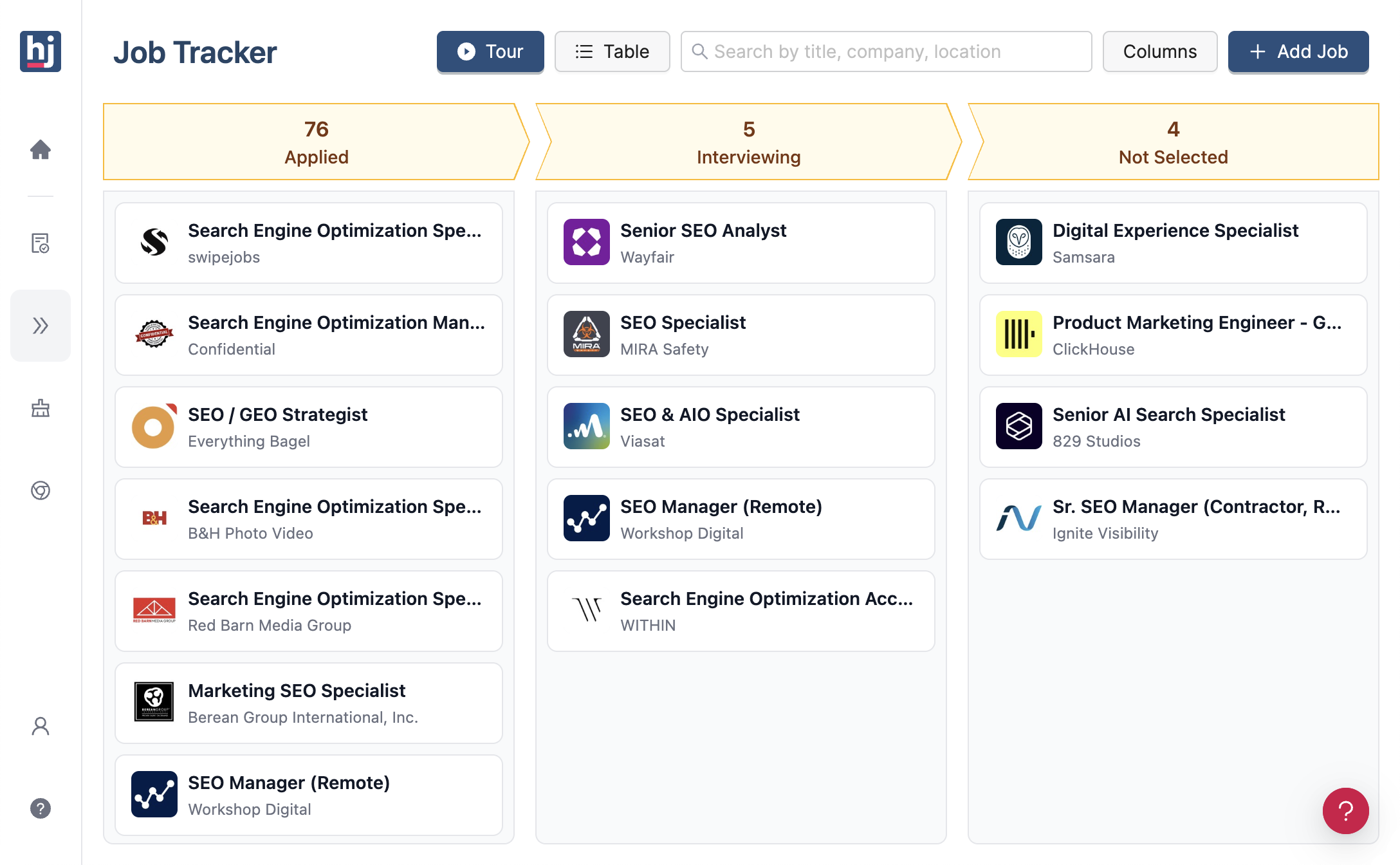
Once your applications are in one place, the tracker gives you a Kanban board to move roles through stages: saved, applied, interviewing, offer, rejected. You can see at a glance where everything stands without having to reconstruct the timeline from memory or search through sent emails.
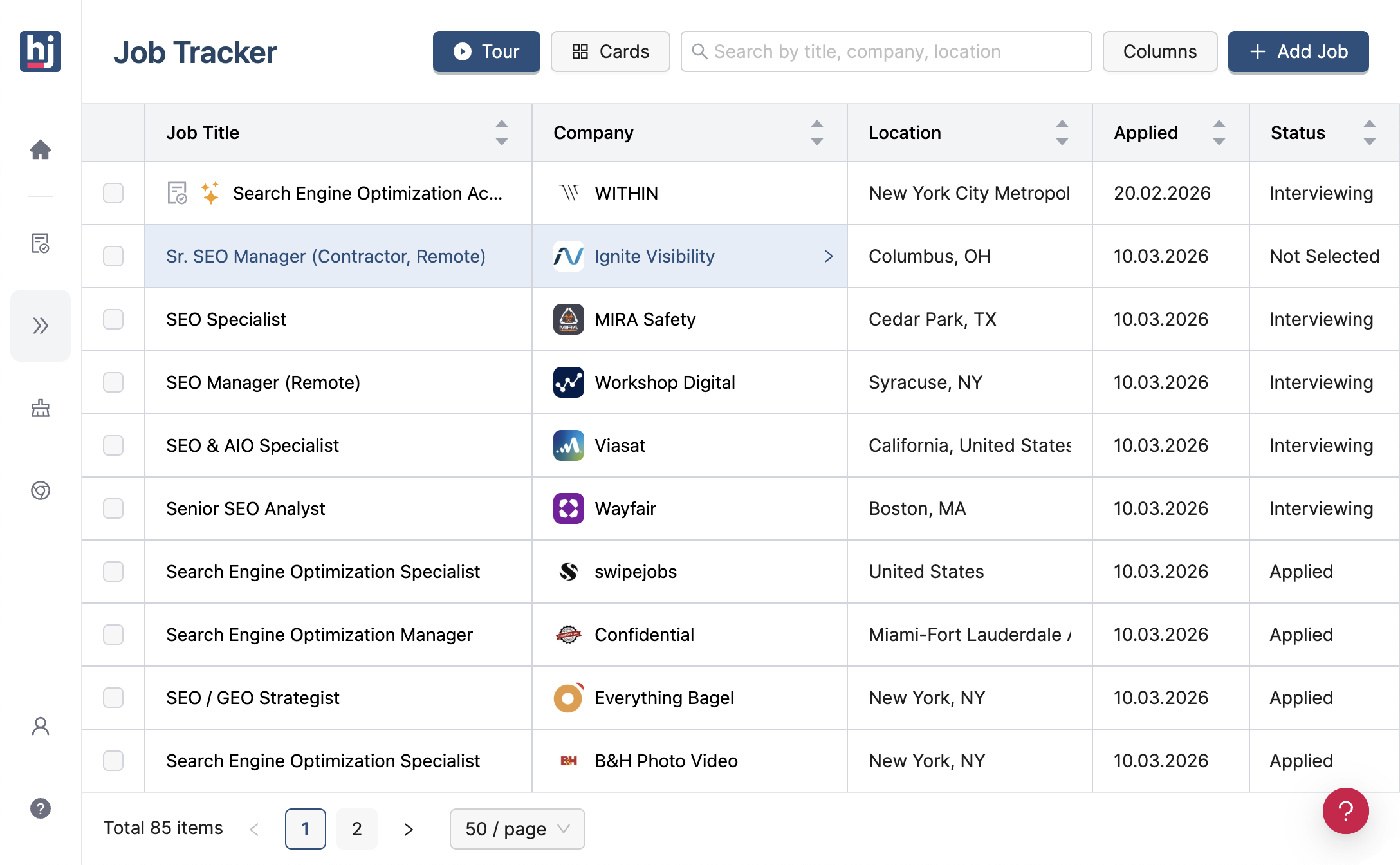
If you prefer rows over cards, the table view shows the same data in a compact list: company, role, date applied, and current status all visible at once. Useful when you want to sort or scan a large pipeline quickly.
What a tracked search gives you
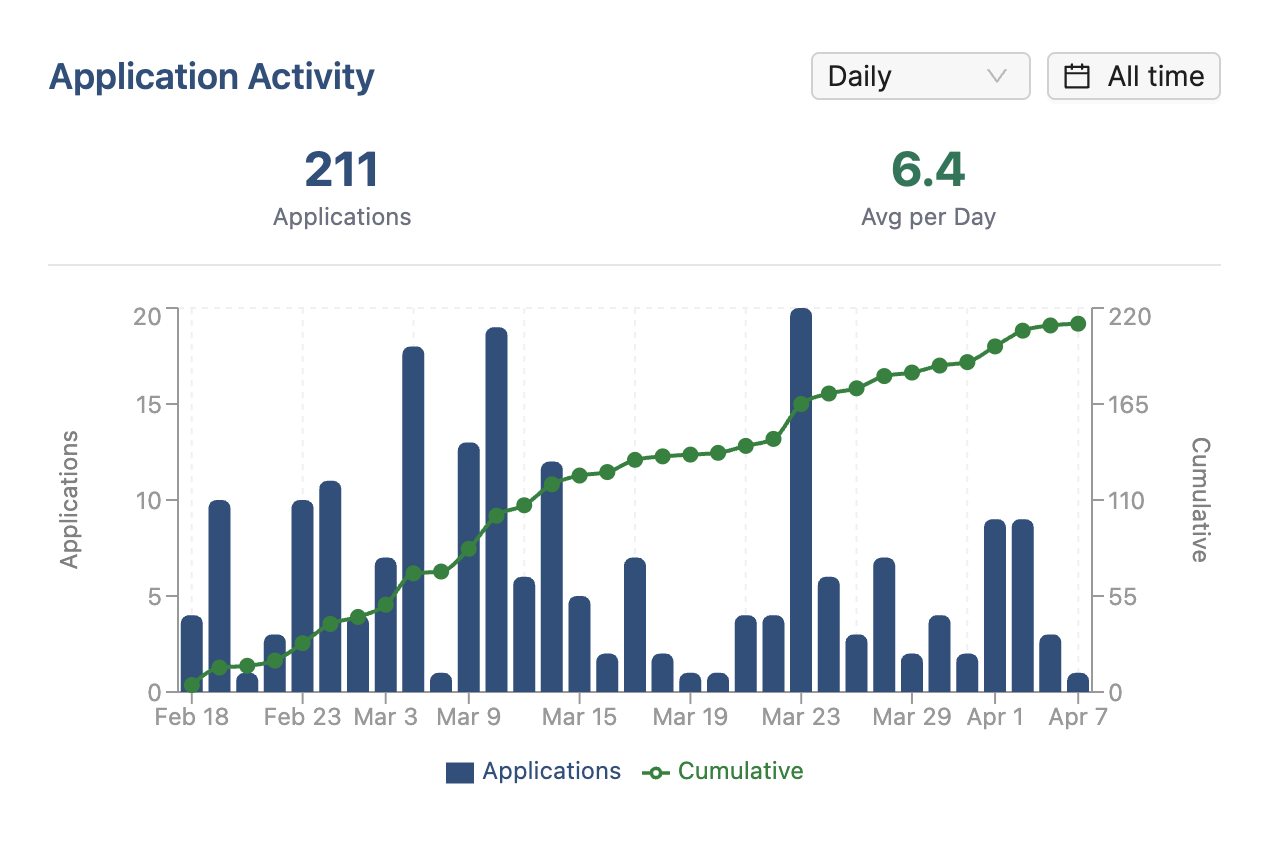
- Application Activity chart: shows how many applications you sent each day and your running total, so you know your real pace rather than a rough feeling
- Follow-up visibility: you can see which applications have gone quiet and are overdue for a check-in
- Pattern recognition: over time you can see which types of roles are moving forward and which are not
- Closure: marking a role as rejected and moving it out of your active pipeline is better for your mental state than leaving it in ambiguous silence
The tracker came out of the same frustration. I had a spreadsheet that I updated for the first two weeks, then stopped. After a month I had no idea what was pending, what had ghosted me, and what I had never followed up on. Building the logging step into the extension was the only way I actually stayed consistent.
The Application Activity chart is part of the tracker for exactly this reason. Burnout often comes with a distorted sense of effort: you feel like you have been grinding all week, but the chart might show three submissions. Or the opposite: you feel paralyzed, but the data shows you are actually hitting your target. Either way, having the real number in front of you is more useful than the feeling. If you are not sure what a realistic weekly target looks like for your situation, see how many jobs you should apply for.
How should you structure your job search day?
A job search without boundaries tends to expand until it colonizes your entire day. That schedule feels like dedication but usually produces worse results than two or three focused hours with a hard stop.
The reason is that open-ended searching encourages low-quality activity. You keep tabs open rather than making decisions. You read the same listings a second and third time. You draft messages and do not send them. None of that is progress, but it feels like effort, which makes it easy to confuse with productivity.
A workable daily structure
- Morning block (45-60 min): find and shortlist new roles. Save more than you plan to apply to, then pick the strongest ones.
- Work block (60-90 min): write and submit applications. One at a time, with your full attention on each one.
- Admin block (15-20 min): check the tracker for follow-ups due, update statuses, send any pending check-in emails.
- Hard stop: close the boards. The search does not exist outside these blocks.
The hard stop is the part most people skip, and it is the most important part. A search that is always technically available will always be quietly draining your attention, even when you are not actively working on it. Treating it like any other work project, with defined hours and a real end to the day, protects the mental energy you need to do the work well.
If you are searching while employed, your available time is more constrained, which actually helps with structure. Even 30-45 focused minutes in the evening, applied consistently, is enough to maintain a real pipeline. You do not need long sessions. You need regular ones.
When should you reassess your job search strategy?
There are two kinds of stalled searches. In the first, the inputs are fine but outcomes take time. In the second, something about the approach is not working and more effort in the same direction will not fix it.
After four to six weeks of consistent, targeted applications with no traction at all, it is worth stepping back and examining the inputs rather than increasing volume. The usual culprits are not hard to identify once you look at them directly.
Things worth reviewing before sending more applications
- Role fit: Are you a realistic match for the roles you are applying to, or are you stretching on most of them?
- Posting age: Are the jobs you are applying to recent? Old listings and reposted jobs often have lower active hiring intent.
- Application quality: Does your resume clearly reflect the language and requirements in the job descriptions you are targeting?
- Competition level: Are you consistently applying to listings with 100+ applicants where standing out is structurally difficult?
Your application tracker is useful here too. If you have three months of data, you can look back and see which types of roles generated responses and which went silent. That is more reliable than intuition for diagnosing what needs to change.
Reassessing is not giving up. It is the more efficient path. Repeating a process that is not working just extends the search and deepens the burnout. A week spent reviewing and adjusting your approach will do more for your outcome than another week of applications sent in the same direction.

Anton writes about job search problems from firsthand experience. He builds tools to solve issues like repeated listings, irrelevant results, and inefficient filtering across job platforms.
Related Resources:
- How Many Jobs Should I Apply For? - Set a realistic application pace based on your timeline and situation
- Ghost Jobs: What They Are and How to Spot Them - Stop spending applications on listings that were never actively hiring
- Job Application Tracker - Track every application, interview round, and follow-up in one place