Quick Answer
To hide dismissed jobs on LinkedIn: Install HideJobs, open the filters panel while on LinkedIn, and toggle on the Dismissed filter. Jobs you've dismissed disappear immediately, with no manual work required.
Note: LinkedIn's "We won't show you this job again" doesn't filter dismissed jobs from search results. They keep appearing because dismissal is not a search filter. Desktop browser extensions are the only reliable fix. The LinkedIn mobile app is not supported.
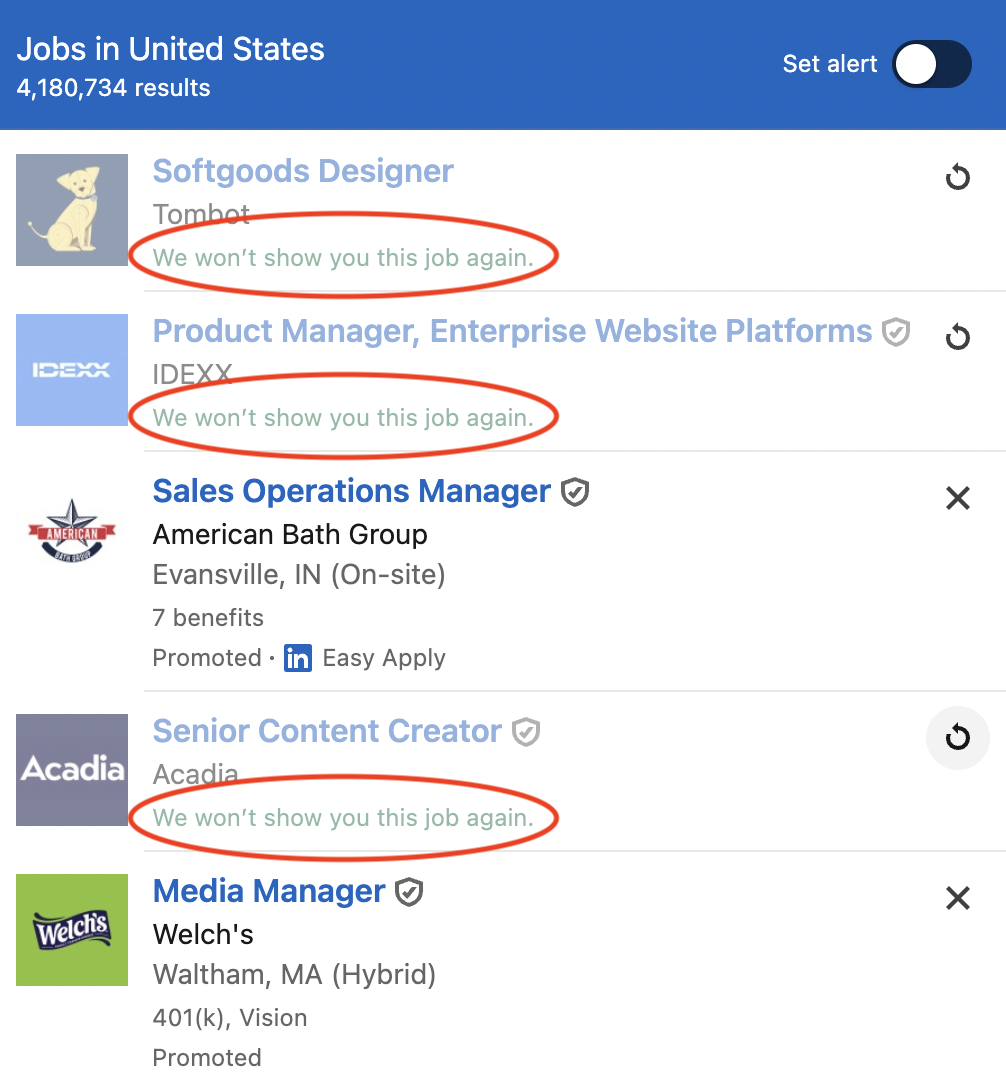
You click the X on a job card. LinkedIn responds with "We won't show you this job again." Search again, and the same job is back.
This isn't a glitch. It's how LinkedIn's dismissal works. That X button is not a search filter, and clicking it doesn't remove the job from future search results. This was actually the frustration that started HideJobs. I was searching for a job myself, kept seeing roles I'd already dismissed, and built a single button just to make them stay gone.
LinkedIn has no native option to filter dismissed jobs out of search. This guide explains why, and what you can do about it.
Why Dismissed Jobs Keep Reappearing in Search Results
When you click the X on a LinkedIn job card, the card fades to partially transparent and shows the label "We won't show you this job again." It's still sitting right there in your results. Nothing is actually removed.
Run a new search and the same jobs are back, still transparent, still showing that label. LinkedIn keeps displaying the exact thing it said it wouldn't show you. This has been a complaint for years, with no fix from LinkedIn.
Why does this happen?
LinkedIn hasn't explained it. The most likely reason, in my view, is a combination of two things: keeping dismissed jobs visible maintains user engagement (more scrolling, more time on the platform), and it preserves impressions for promoted listings that employers paid to appear in results.
How to Hide Dismissed Jobs on LinkedIn
Some users have resorted to writing custom CSS just to hide dismissed cards. A browser extension is a cleaner solution. HideJobs includes a built-in Dismissed filter, available on the free plan with no subscription required.
Install the HideJobs browser extension, open LinkedIn, and navigate to any job search results page. Click the HideJobs panel icon to open the filters. Toggle the Dismissed filter on. Every listing carrying LinkedIn's dismissed state disappears from the page immediately, with no page reload needed.
Unlike LinkedIn's own dismissal, this filter is persistent. It stays active as you navigate between search queries, scroll through new pages, and return to LinkedIn in future sessions. HideJobs checks each listing for LinkedIn's dismissed state and removes matching results automatically. You configure it once, and it runs in the background from that point on.
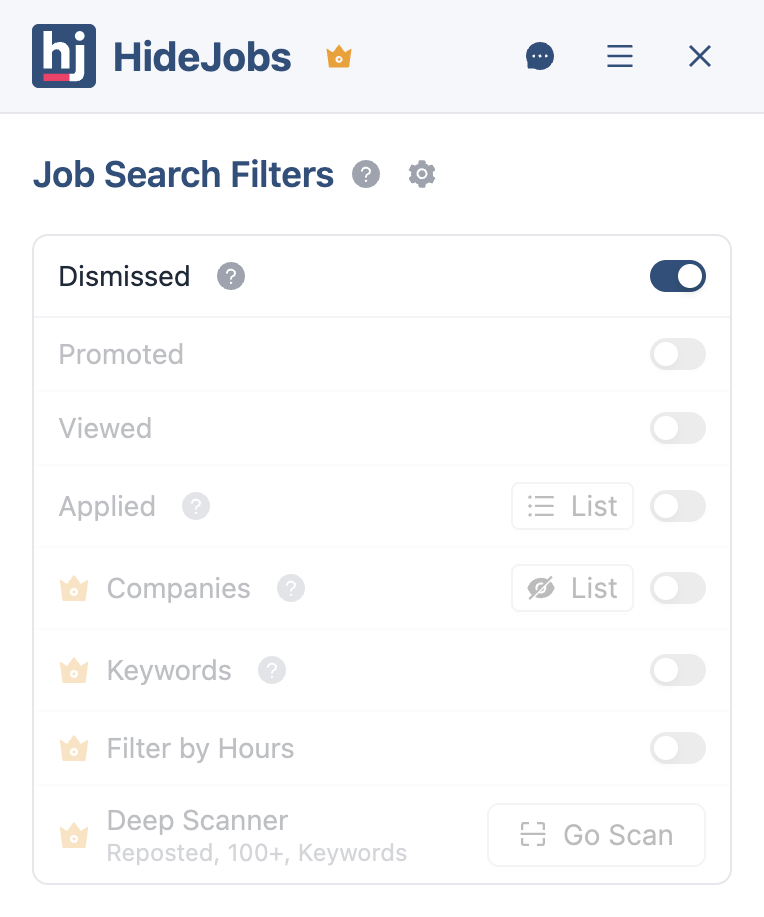


The Dismissed filter also stacks with every other HideJobs filter. You can run Dismissed alongside the Applied filter (for jobs you've submitted to), the Viewed filter (for jobs you've opened), the Promoted filter (for paid listings), and company-level exclusion lists, all at the same time. For a closer look at applied job filtering, see the guide on how to hide applied jobs on LinkedIn. For promoted listing filtering, see how to hide promoted jobs on LinkedIn.
What Changes When You Filter Dismissed Jobs
The specific relief here is psychological. LinkedIn showed you a card, you made a decision about it, and then LinkedIn kept showing it to you anyway with a label that says it won't. That contradiction is small, but it compounds across every search. Filtering dismissed jobs doesn't just clean up results. It makes LinkedIn's own promise finally true.
- Your decisions stick. You dismiss a job once. It's gone from every subsequent search. You never have to look at it again or re-process a decision you already made.
- No more contradictory labels. The "We won't show you this job again" card sitting in your results is a small but constant irritant. With the filter on, that experience disappears entirely.
- Especially useful for long searches. If you search the same keyword over weeks, dismissed jobs pile up fast. The filter keeps results clean from the first session onward, not just when you're starting fresh.
- Stack with other filters. Dismissed works alongside Applied, Viewed, Promoted, and company exclusions simultaneously. For filtering out listings you've already opened, see how to hide viewed jobs on LinkedIn.

Anton writes about job search problems from firsthand experience. He builds tools to solve issues like repeated listings, irrelevant results, and inefficient filtering across job platforms.
Related Resources:
- How to Hide Applied Jobs on LinkedIn - Remove jobs you've already applied to from your search results
- How to Hide Viewed Jobs on LinkedIn - Filter out listings you've already opened from your results
- How to Hide Promoted Jobs on LinkedIn - Filter out paid promoted listings and surface organic job results