Quick Answer
To filter out reposted jobs on LinkedIn: Use HideJobs Deep Scanner to automatically detect and hide jobs marked "Reposted X days ago." The tool scans your search results, flags reposted jobs with visible badges, and lets you hide them with one click.
What "Reposted" means: Employers manually refresh listings to push them back to the top of search results. LinkedIn does not automatically repost jobs—all reposts are employer-initiated.
Looking to filter out reposted jobs on LinkedIn? When you search for jobs on LinkedIn, you'll often see postings marked "Reposted X days ago." These are listings employers have manually refreshed to appear newer in search results, even though they may have been open for weeks or months.
This guide shows you how to automatically remove reposted jobs from your LinkedIn search results using HideJobs Deep Scanner—a tool that detects these reposted listings and gives you control over whether to see them or hide them completely.
What Does "Reposted" Mean on LinkedIn?
When LinkedIn shows "Reposted X days ago" on a job listing, it means the employer manually refreshed the posting to push it back to the top of search results. The original job may have been posted weeks or months earlier, but the repost makes it appear newer.
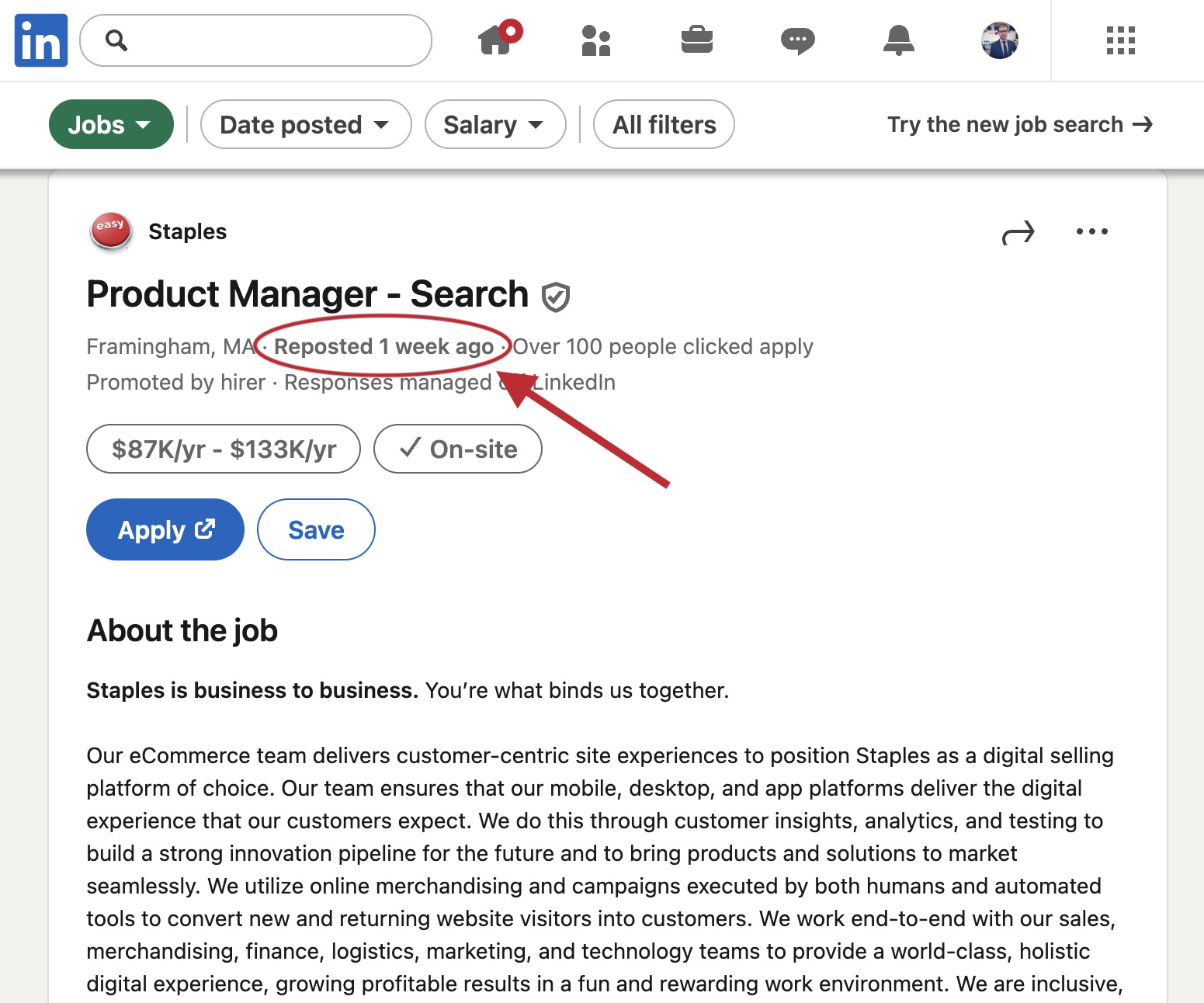
The repost label indicates how many days ago the employer refreshed the listing, not when the job was originally posted. This distinction is important because a job showing "Reposted 3 days ago" might actually be several months old.
Key Point:
LinkedIn does not automatically repost jobs. Every repost is a manual action by the employer, typically done to maintain visibility in search results or to expand their candidate pool.
Does LinkedIn Automatically Repost Jobs?
No, LinkedIn does not automatically repost jobs. Employers manually choose to refresh or renew their listings. This manual process happens for several reasons:
- Promoted post expiration: According to LinkedIn's Recruiter documentation, promoted job posts run in cycles of 14-30 days. When a promoted post expires, employers can renew it, which counts as a repost.
- Expanding candidate pool: If initial applicants don't meet requirements, hiring teams repost to attract new candidates.
- Maintaining visibility: As jobs age, they drop in search rankings. Reposting pushes them back to the top, making them appear fresh.
Understanding that reposts are manual helps you interpret what they mean for your job search. A reposted job might indicate continued active hiring, or it might suggest the employer is struggling to find qualified candidates.
How to Filter Out Reposted Jobs on LinkedIn
LinkedIn doesn't offer a built-in filter to hide reposted jobs. You can manually scan for the "Reposted X days ago" label on each card, or sort results by "Most Recent" to push older reposts further down. Both approaches still require reviewing each listing individually.
HideJobs Deep Scanner automates this by detecting and badging all reposted jobs at once. Open the HideJobs filters panel and click "Go Scan" on the Deep Scanner filter. This opens the Deep Scanner panel where you can select "Reposted" and click "Start Scan" to begin detecting reposted jobs in your search results.
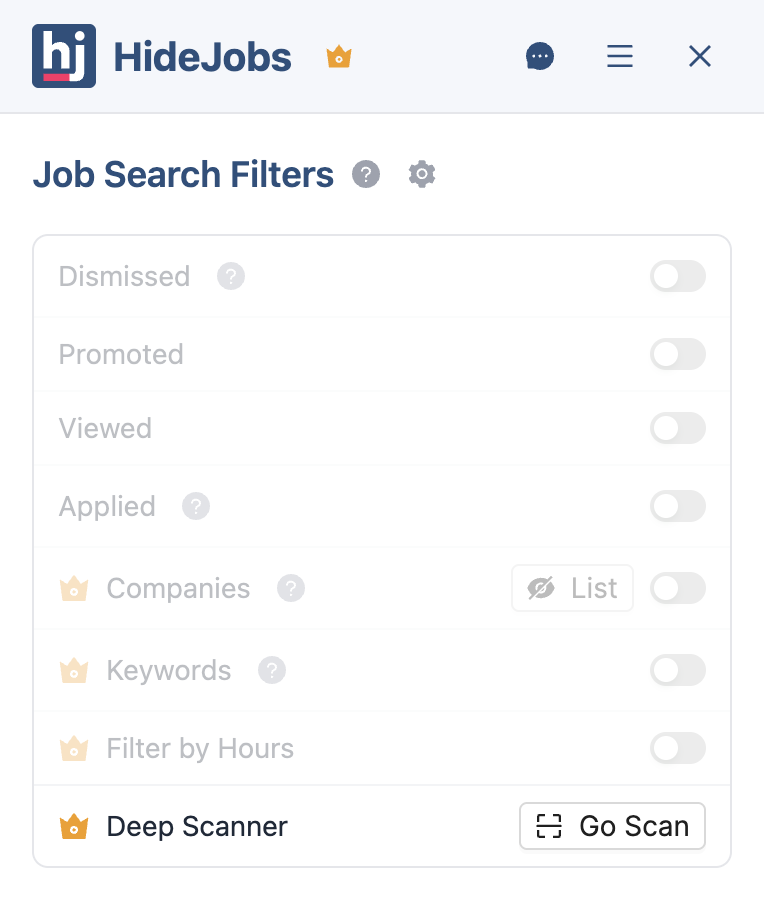
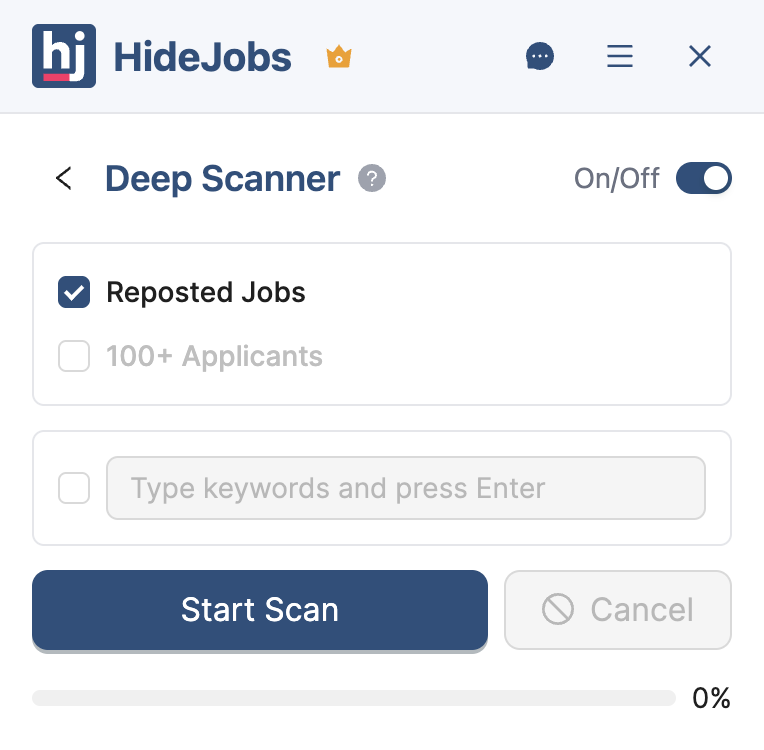
The scanner goes through your search results and identifies any job that LinkedIn has marked with a "Reposted X days ago" label. It adds a visible black badge to each reposted job card and saves them to your Scan History with the job title and company name.
You can immediately see which jobs are reposts right on the search results page without opening each one. If you want to hide them from view, simply turn on the "Hide Reposted" toggle—but you can also leave them visible with just the badges if you prefer to keep track of what's been reposted while still seeing everything.
Once the scan completes, the Deep Scanner panel shows a full list of detected reposts in your Scan History with job titles and company names.
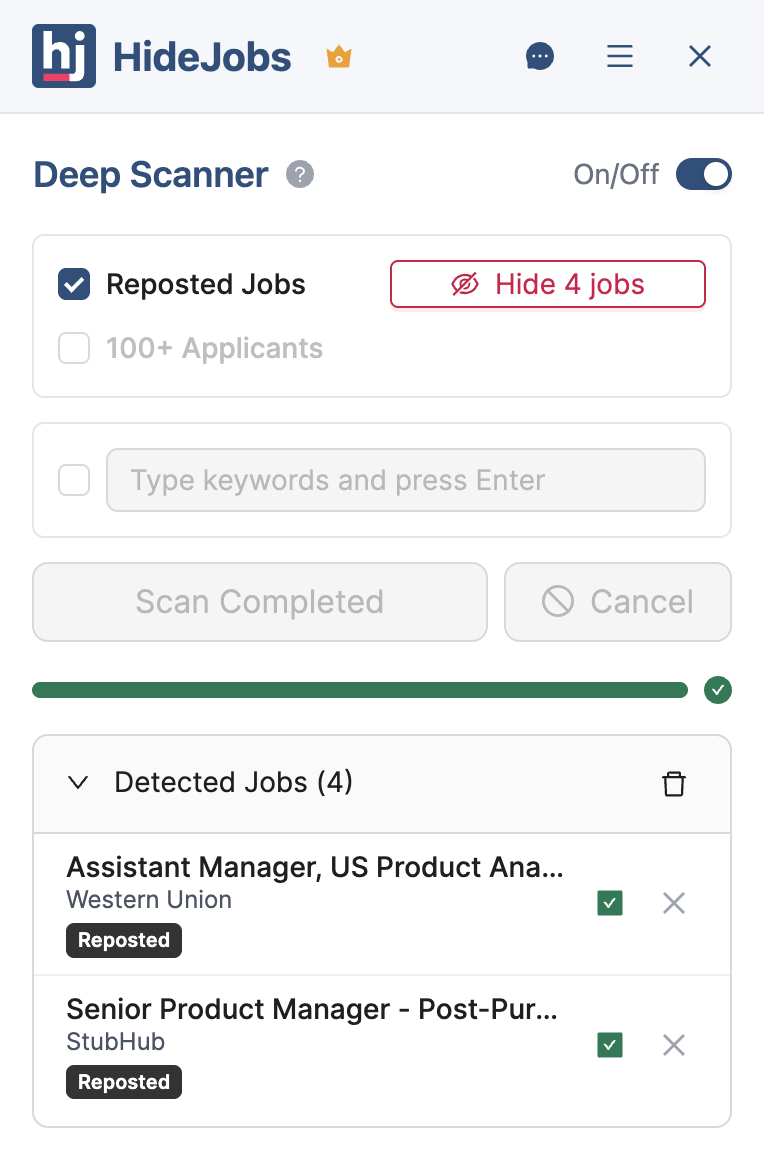
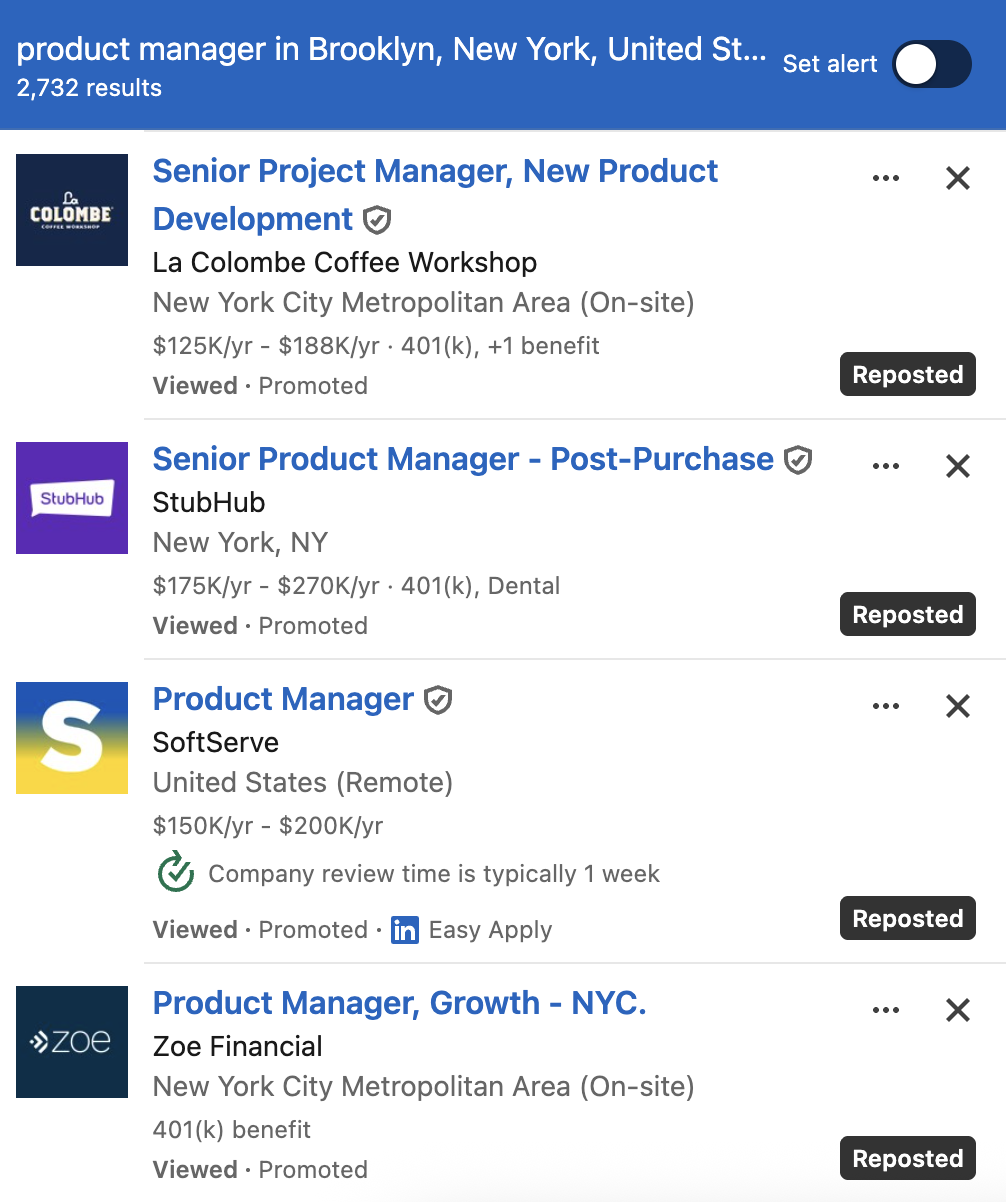
This works everywhere LinkedIn shows job listings—search results, recommended jobs, jobs by category. Anywhere a "Reposted" label exists, HideJobs can detect and flag it. You don't need to configure anything or maintain lists manually. HideJobs reads LinkedIn's own markers and handles everything automatically.
HideJobs only flags jobs that LinkedIn itself has labeled as reposted. You're working with the same information LinkedIn provides, but with the power to filter and track it systematically. All data is stored locally on your device—HideJobs doesn't upload your job search history or share information with anyone.
Why Do Jobs Get Reposted on LinkedIn?
Understanding why employers repost jobs helps you decide which reposted listings deserve your attention and which ones to skip. There are four primary reasons jobs get reposted on LinkedIn:
Paid Promotion Cycles
According to LinkedIn's Recruiter documentation, promoted job posts run in cycles of 14-30 days. When a promoted post expires, employers can renew it to maintain visibility in search results. The renewal pushes the job back to the top of feeds, making it appear fresh even when the role has been open for months.
Expanding the Candidate Pool
Hiring teams often repost when initial candidates don't meet requirements or when they want to see a broader range of applicants. While this serves the employer, it creates confusion for candidates who may have already reviewed or applied to an earlier version of the listing.
Building Talent Pipelines
Companies sometimes keep jobs posted to maintain a visible hiring presence and collect resumes for future opportunities, even when they're not actively filling a specific role. As a job seeker, this means a posting may stay live for months with no active review of applications. It's worth filtering these out if you've already applied or if the listing has been reposted repeatedly without changes.
Ghost Job Postings
Many companies keep job postings active with no immediate plans to fill them. Common reasons include keeping options open during hiring freezes, maintaining an impression of growth, and building talent pools for future needs. For job seekers, these listings waste time and create false hope. If a role has been reposted multiple times with no changes to the description, it's likely not an active opening.
Regardless of the employer's reason, the result is the same for you: search results filled with listings that may not represent genuine, immediate opportunities. This is why filtering reposts becomes essential for an efficient job search.
The Cost to Your Job Search
The frustration of seeing repeated jobs isn't just emotional—it represents real, measurable damage to your job search effectiveness. Here's what the research shows:
A 2024 report from Greenhouse found that job seekers are now applying to an average of 46 jobs before receiving an offer. One major contributor to this application fatigue is the sheer number of recycled and reposted listings appearing in search results.
Based on HideJobs Deep Scanner data, 20-30% of LinkedIn job search results are reposts—listings employers have manually refreshed rather than new opportunities. If you're actively searching and spending 10-15 hours per week reviewing positions, that means 2-4 hours weekly are going toward listings you've already evaluated. Over a typical 12-week job search, that's 24-48 hours—more than a full work week—spent re-evaluating reposted jobs.
In building HideJobs' Deep Scanner, I found this was one of the most common frustrations users described: they'd open a listing, realize partway through that they'd already reviewed it two weeks ago, and lose the momentum of their search session. The repost label was easy to miss on quick scans.
- Lost time. Every job listing requires mental energy: reading the description, comparing requirements, deciding whether to apply. When 25-30% of your results are reposts, you're spending hours each week re-evaluating positions you've already considered.
- Missed opportunities. Reposted jobs don't just waste time—they push newer opportunities further down in your results. If you focus on the first 20-30 listings, fresh jobs appearing below recycled posts may never get your attention.
- Decision fatigue. Repeatedly evaluating the same information drains your decision-making capacity. This fatigue can lead to poor decisions about genuine opportunities or cause you to miss important details.
- Tracking confusion. When employers repost roles, it becomes difficult to remember whether you've already evaluated or applied to that listing. This uncertainty wastes mental energy and can cause you to skip opportunities unnecessarily.
What Changes with Filtering
Having reposted jobs clearly labeled changes how efficiently you can search. With the black badges visible on every reposted job card, you can instantly identify which listings you've already seen without opening them. This alone speeds up your search significantly.
If you want to go further, turning on the "Hide Reposted" toggle removes those jobs from view entirely, so every job on your screen is genuinely new. The choice is yours—some people prefer to see everything with badges for full visibility, while others want reposts hidden completely to maximize focus.
Here's what improves with the Deep Scanner:
| Without HideJobs | With HideJobs Deep Scanner |
|---|---|
| Can't spot reposts without opening it | Black badge on every reposted job card |
| Keep re-evaluating the same listings | Spot reposts at a glance |
| 2–4 hours/week wasted on reposted jobs | Time redirected to genuine opportunities |
| Same stale jobs appearing every search | "Hide Reposted" button for a clean view |
| Manual tracking in spreadsheets | Automatically saved to Scan History |
- Instant identification. The black badges let you spot reposted jobs immediately without opening each listing. You can scan your results faster because you know at a glance which jobs are recycled.
- Optional hiding. If you want a completely clean view, turn on the "Hide Reposted" toggle and those jobs disappear, leaving only fresh listings. If you prefer to see everything, leave the toggle off and just use the badges for awareness.
- Better focus. Whether you hide reposts or just label them, you're no longer guessing which jobs you've seen before. The mental energy you save on "have I reviewed this already?" can go toward evaluating actual opportunities.
- Less frustration. Seeing the same jobs repeatedly without knowing they're reposts is demoralizing. The badges give you clarity, and hiding gives you a clean workspace when you need it.
- Combined filtering. The Deep Scanner works alongside HideJobs' other filters. You can hide applied jobs, exclude unwanted companies, and filter reposted jobs simultaneously, creating results that are both fresh and relevant to what you're looking for.
- Complete control. You can toggle hiding on and off anytime, check your Scan History to see what was detected, and unhide specific jobs if needed. Nothing is permanent—you maintain full visibility into what's happening.
Job searching already requires enough energy without fighting cluttered interfaces or wondering which jobs you've already reviewed. With HideJobs, you get clear badges on every reposted job card, so you always know what you're looking at. Whether you choose to hide those jobs or just keep them labeled, you're spending your time more effectively.
The time savings compound over a job search. Just having the badges visible can save you 5-10 minutes per session by eliminating guesswork. If you turn on hiding, you save even more by skipping past recycled listings entirely. Over a week, that becomes an hour. Over a month of active searching, you're reclaiming several hours that would otherwise go to repetitive evaluation. That's time you can redirect toward better applications, networking, or preparing for interviews.

Anton writes about job search problems from firsthand experience. He builds tools to solve issues like repeated listings, irrelevant results, and inefficient filtering across job platforms.
Related Resources:
- Should You Reapply to a Reposted Job? - Learn when reapplying makes sense and when it wastes your time
- Should You Apply to Jobs with 100+ Applicants? - Discover the truth behind high applicant counts
- How to Hide Applied Jobs on LinkedIn - Keep your search results focused on fresh opportunities