Quick Answer
Yes, you should apply if:
- You meet 70%+ of the requirements
- The job was posted within the last 48 hours
- You can customize your application
- The role aligns with your career goals
Skip if:
- The job has been open for 30+ days (likely a ghost job)
- You meet fewer than 50% of requirements
- You're relying on Easy Apply without customization
- The company has a poor reputation for responding
The "100+ applicants" label is misleading—your real competition is typically 20-40 qualified candidates, not hundreds.
The intimidation factor
You've found the perfect job posting. The role matches your skills, the company culture sounds great, and the responsibilities align with your career goals. Then you see it: "Over 100 applicants."
That number hits differently. Suddenly, applying feels pointless. Why bother when hundreds of other people are competing for the same role? This psychological barrier stops countless qualified candidates from submitting their applications every single day.
But here's what most job seekers don't realize: that "100+ applicants" label is one of the most misleading metrics in the entire job search process. Understanding the numbers can transform your approach to job hunting and significantly improve your chances of landing interviews.
What "100+ applicants" really means
LinkedIn's applicant counter doesn't work the way most people think. According to recruiting professionals, the number you see often represents clicks on the "Apply" button, not completed applications.
When LinkedIn displays "Over 100 applicants," they're deliberately vague. In late 2023, LinkedIn changed their system to show this generic label instead of specific numbers for any posting with 100 or more clicks. This was meant to reduce discouragement among job seekers, but it created a new problem: now every high-volume posting looks equally competitive, whether it has 101 clicks or 1,000.
The reality is more nuanced. Research from experienced recruiters reveals that between 20-25% of people who click "Apply" never actually complete the application process. They start filling out forms, get distracted, or decide the role isn't right for them. These incomplete attempts still count toward that intimidating number you see.
Even more revealing: recruiting managers from major tech companies report that only 2-5% of applications actually match the job requirements. The vast majority of applicants are unqualified, hoping for a lucky break.
Your actual competition: The math
Let's break down what really happens when you see a high applicant count. We'll use 200 as our example—a number that would show as "100+ applicants" on LinkedIn—based on analysis from career coaches who review applications daily. Each step filters from what remains after the previous step:
Starting point: 200 people clicked "Apply"
- 200 clicks: 30% never finish applying → 140 completed applications
- 140 applications: 30% are unqualified → 98 meet basic requirements
- 98 qualified: 25% have poor resumes → 74 competitive resumes
- 74 competitive: 50% never follow up → 37 take action after applying
- 37 proactive: 30% send bad outreach → 26 effective candidates
Your real competition: About 26 serious, qualified candidates
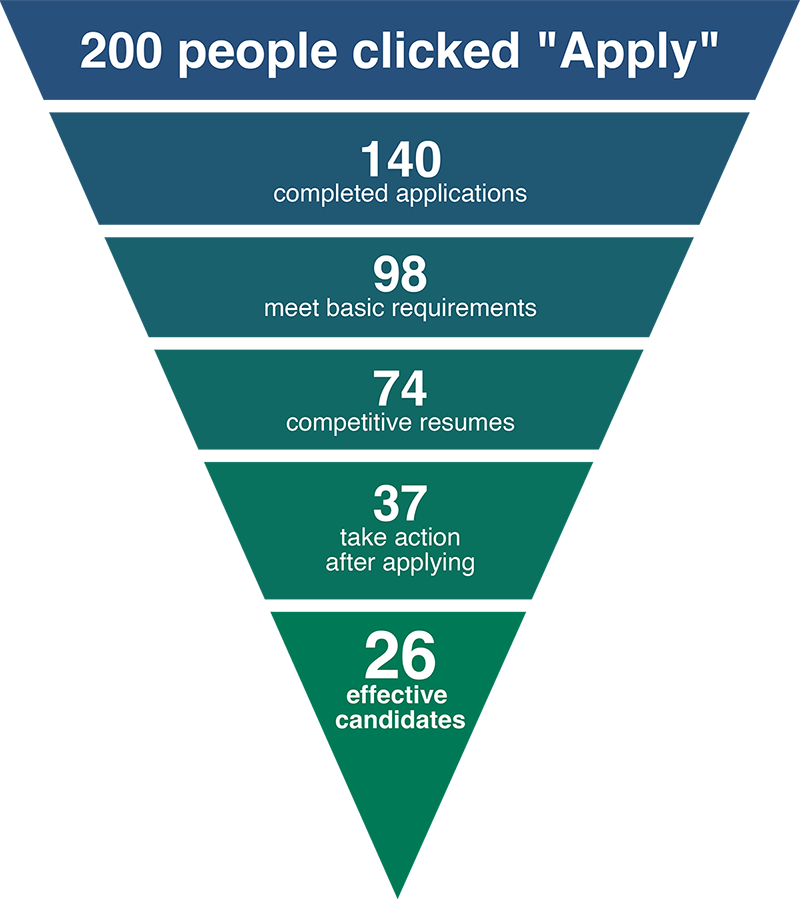
This calculation is based on years of hiring experience from career coaches and recruiters. The numbers shift slightly depending on industry and seniority level, but the pattern holds: your actual competition is roughly 13% of the displayed number—a small fraction of what LinkedIn shows.
When I analyzed feedback from HideJobs users who filter 100+ applicant jobs, the most common reaction after seeing their results without these postings was surprise at how many genuinely fresh, lower-competition roles they'd been overlooking. The high-count jobs dominated their attention by sheer volume.
The proliferation of Easy Apply bots has made this problem worse. Multiple open-source projects exist that automatically apply to hundreds of jobs per day. These bot applications rarely include customized cover letters or tailored resumes, making them easy for recruiters to spot and discard. But they still contribute to that intimidating applicant count.
The ghost jobs problem
Here's an uncomfortable truth: some of those job postings with "100+ applicants" aren't even real opportunities. A 2024 survey found that 40% of companies posted fake job listings, and 30% currently have ghost jobs active on their sites.
Ghost jobs are legitimate-looking postings from real companies that have no intention of hiring. Companies post them to:
- Build a talent pipeline for future openings
- Make employees feel replaceable (motivating them to work harder)
- Signal company growth to investors and stakeholders
- Collect market data on salary expectations and available talent
- Fulfill internal posting requirements even after an internal candidate is selected
Recent analysis suggests 27.4% of all U.S. job listings on LinkedIn are likely ghost jobs. That means more than one in four postings you see might not result in any hire at all, no matter how many people apply.
The hiring platform Greenhouse reported that 18-22% of online job ads are fake or unfilled, with some industries showing rates as high as 38% in construction and 31% in corporate services. Perhaps most disturbing: 85% of companies that post ghost jobs even conduct interviews, wasting countless hours of candidates' time.
Red flags for ghost jobs:
- Job posted more than 30 days ago
- Vague job description with generic responsibilities
- No salary range provided
- Company repeatedly reposting the same role
- Interview process drags on without clear next steps
When to apply vs. when to skip
Not all "100+ applicant" jobs are worth your time, but dismissing them all means missing genuine opportunities. Here's a decision framework based on research and recruiter insights:
Strong signals to apply:
- You meet 70%+ of the stated requirements. If you have the core skills and most of the experience, you're likely in that 2-5% of qualified applicants.
- The job was posted in the last 7 days. Fresh postings mean recruiters are still actively reviewing resumes. Applications submitted within the first few days get priority attention.
- Specific, detailed job description. Real jobs have concrete responsibilities, clear requirements, and defined team structures. Generic postings are often placeholders.
- Salary range is listed. Companies serious about hiring provide compensation details. It helps qualified candidates self-select and reduces wasted time on both sides.
- You have a referral or connection. Recruiters prioritize referral candidates, and these applications often bypass the initial applicant pool entirely.
Proceed with caution:
- Job posted 2-4 weeks ago. Still possible, but hiring urgency has likely decreased. Apply only if it's a strong match.
- You meet 50-70% of requirements. Possible if your missing skills are transferable or learnable. Include a strong cover letter explaining how you'll bridge gaps.
- Company posts many similar roles. Could indicate genuine growth, or could be pipeline building. Research the company's recent hiring patterns.
Probably skip:
- Job posted more than 30 days ago. If a job has been open for months, it's almost certainly a ghost posting. Companies looking to fill positions move quickly.
- You meet less than 50% of requirements. Unless you have a unique advantage, you're not in that qualified 2-5%. Your time is better spent on closer matches.
- Same role reposted multiple times. Continuous reposting often means they're not serious about hiring or have unrealistic expectations.
- No specific details or metrics. Ghost jobs tend to be vague because they're not tied to actual needs.
Strategic filtering for better results
Managing high-competition postings isn't about avoiding them entirely—it's about making strategic decisions about where to invest your limited time and energy. The challenge is that LinkedIn, Indeed, and other job boards don't give you tools to systematically handle these postings.
This is where visual filtering becomes valuable. Being able to quickly identify which jobs have 100+ applicants as you browse lets you make informed decisions without losing track of opportunities.
Two approaches to high-competition postings:
Approach 1: Highlight and prioritize
Some job seekers prefer to see everything and make case-by-case decisions. In this approach, you want high-competition postings clearly marked so you can quickly assess: "Is this worth my time given the competition level?" You might apply to a 100+ applicant job if it's your dream role at your target company, posted yesterday, and you meet all requirements. But you'll skip another 100+ posting that's been up for six weeks with vague requirements.
Best for: Job seekers with specific target companies, experienced professionals with niche skills, or those who want maximum control over their search.
Approach 2: Filter out by default
Other job seekers find that high-competition postings create noise and distraction. They'd rather focus their energy on opportunities where they have better odds. For these people, automatically hiding 100+ applicant jobs and only reviewing them occasionally makes the search process less overwhelming and more efficient.
Best for: Early-career professionals, career changers facing tough competition, or anyone feeling overwhelmed by their job search.
The key insight is that different strategies work for different people and different stages of your search. You might start by filtering aggressively to reduce overwhelm, then switch to highlighting once you've established a rhythm and want to expand your options.
Using HideJobs for strategic filtering
HideJobs helps you implement either approach—or switch between them—without losing track of what you've filtered. The extension automatically detects postings with 100+ applicants across LinkedIn, Indeed, Glassdoor, Monster, and ZipRecruiter.
The extension uses a deep scanner that reads each job listing as it loads on the page. When it finds LinkedIn's "Over 100 applicants" label or similar high-competition indicators on other platforms, it marks that posting automatically. You don't need to manually identify them—HideJobs does the detection work for you in real time.
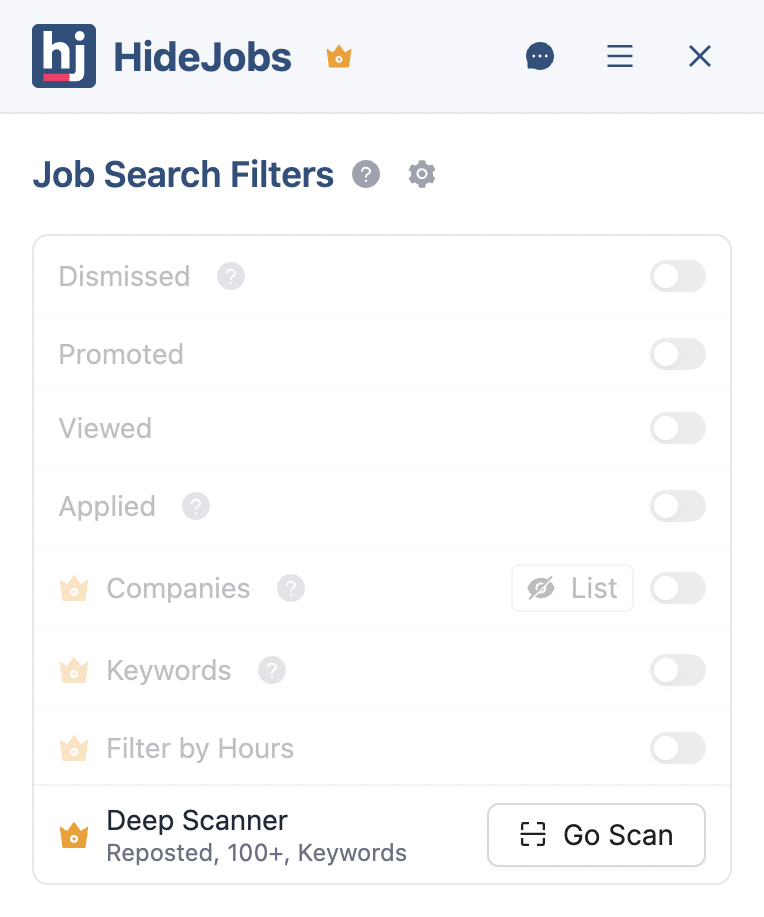
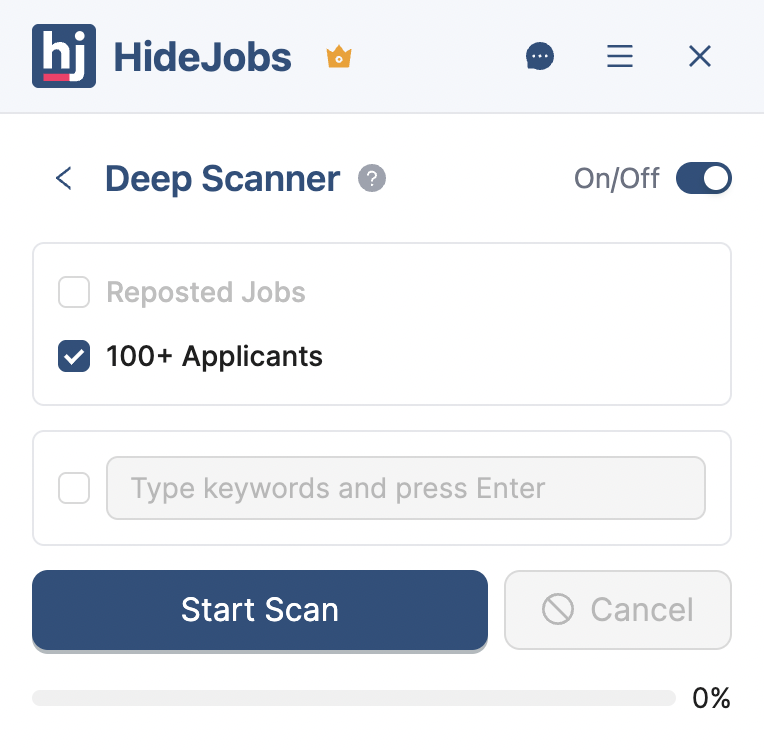
Highlight mode:
High-competition jobs are visually marked with a badge, making them instantly recognizable as you browse. You see everything but can quickly identify which opportunities face steeper competition. This lets you prioritize your strongest applications for these postings while moving faster on others.
The badge appears directly on each job card, so you can scan an entire page of results and immediately spot which jobs have 100+ applicants without clicking into each listing.
Hide mode:
High-competition jobs are automatically removed from your view, letting you focus on postings with better odds. The jobs aren't gone forever—you can toggle the filter off anytime to review what you've filtered and decide if any warrant a second look.
A counter badge shows how many high-competition jobs have been hidden from the current page, keeping you informed about what's being filtered without cluttering your results.
The 100+ applicants filter works alongside HideJobs' other filters. You can combine it with company exclusions, applied jobs filtering, or keyword filters to create highly targeted search results. For example, hide all jobs with 100+ applicants AND exclude specific companies at the same time.
Both approaches work because they give you visibility and control. You're not blindly applying to everything or arbitrarily skipping opportunities. You're making informed decisions based on competition level, and you can adjust your strategy as your search evolves.
The deep scanner runs automatically on all supported job platforms, so whether you're searching on LinkedIn today and Indeed tomorrow, the same filtering logic applies. Your preference to highlight or hide 100+ applicant jobs follows you across every site without needing separate configurations.
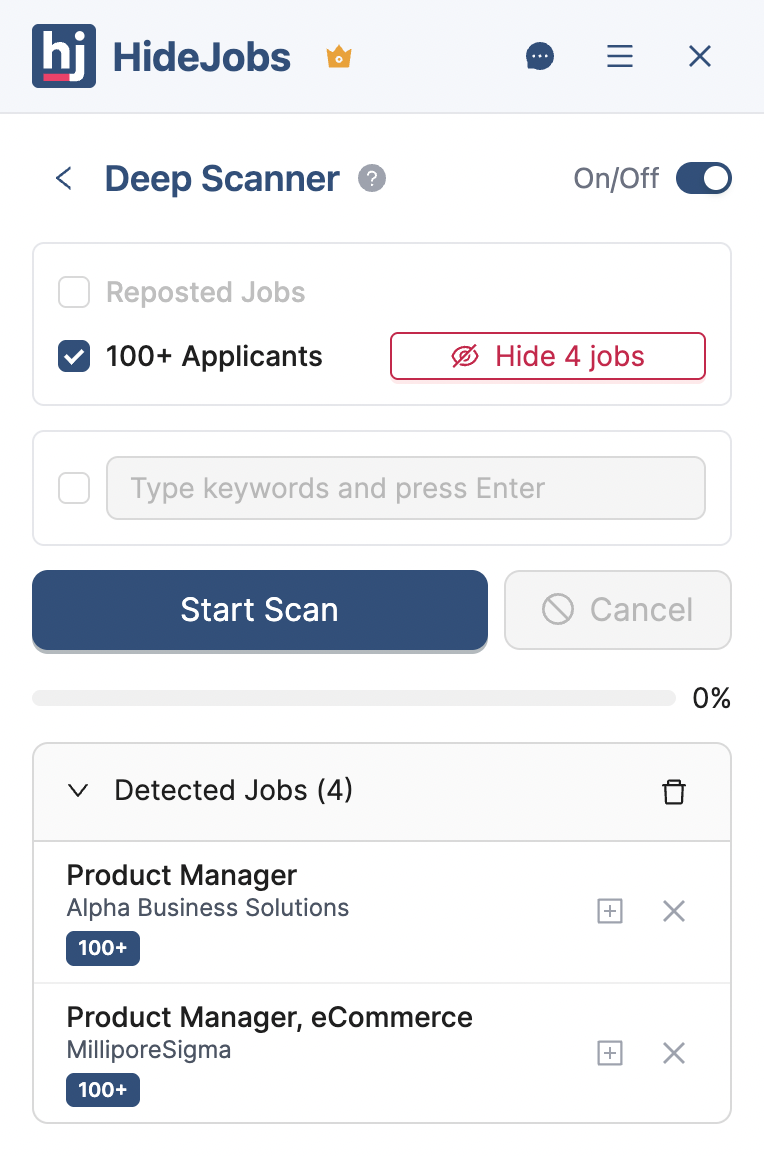
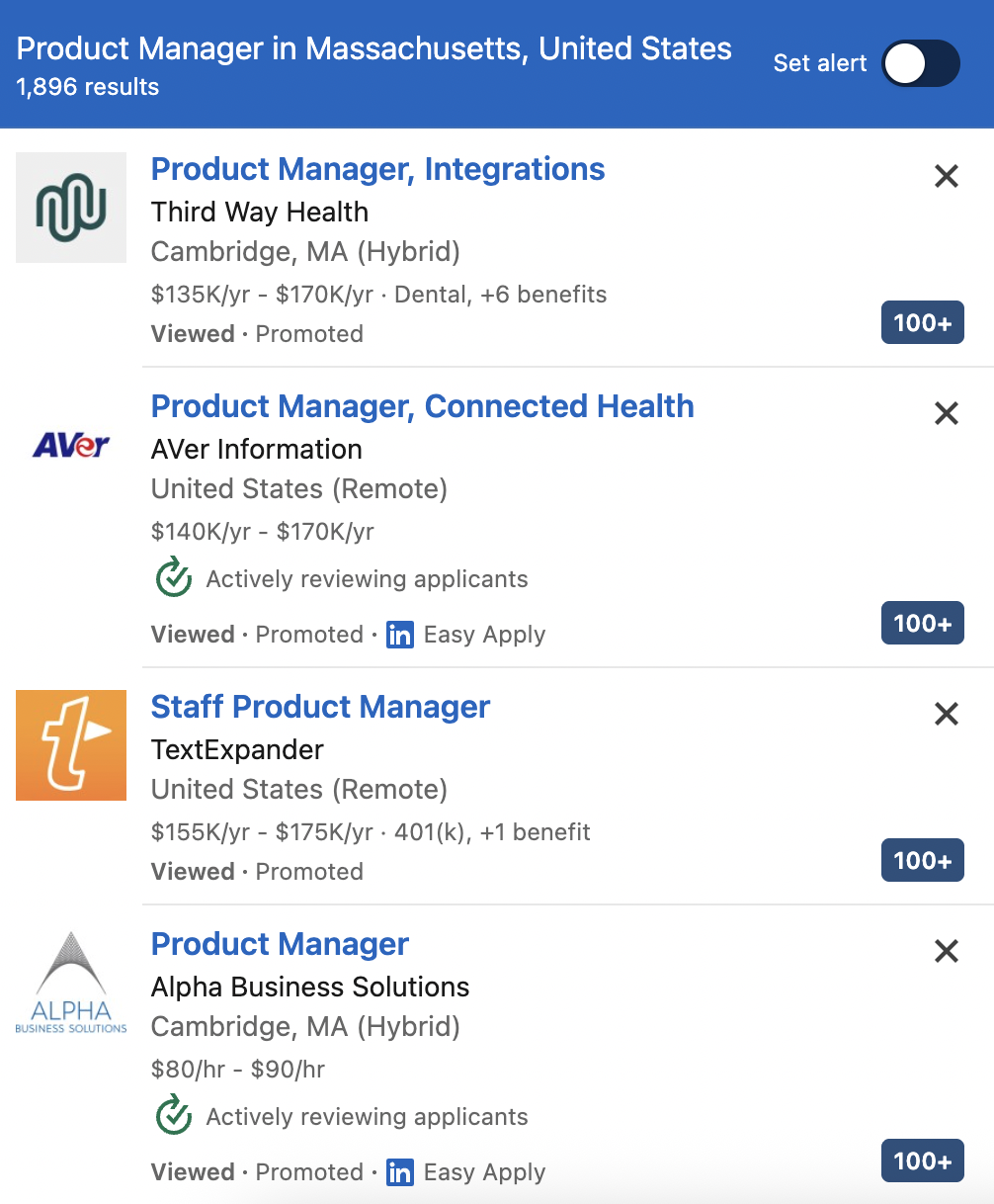
Once the scan completes, you'll see exactly which jobs on the current page have 100+ applicants. Each detected job gets a clear visual label, so you can make informed decisions as you browse. No more guessing or clicking into individual postings to check competition levels—the information is right there on the search results page.
The entire workflow happens seamlessly in the background. You continue browsing normally while HideJobs works to identify high-competition postings and present them according to your preference. Whether you choose to highlight or hide these jobs, the process is automatic and instant.
Making high-competition applications work
When you do decide to apply to a high-competition posting, you need to stand out from that 20-40 genuine competitors. Here's what actually works, according to recruiters:
Customize everything
Generic applications are easy to spot and easy to reject. Tailor your resume to highlight the specific skills mentioned in the job description. Write a cover letter that addresses the company's stated needs and explains why you're interested in this specific role. Reference company values, recent news, or products that resonated with you.
Apply within the first 48 hours
Recruiters are most active in the first few days after posting a job. Your application has a better chance of serious review if it arrives early. By day 7, they may have already identified several strong candidates and are giving less attention to new submissions.
Follow up strategically
After applying, find the hiring manager or recruiter on LinkedIn. Send a brief, professional message expressing your interest and highlighting one specific qualification that makes you a strong match. Don't just repeat your resume—add new information or context.
Leverage your network
Internal referrals bypass most of the competition. If you know someone at the company, ask for an introduction to the hiring manager. Even a weak connection is better than no connection. Recruiters consistently rank referred candidates higher than cold applicants.
Show specific results
Don't just list responsibilities—quantify your impact. "Managed social media accounts" becomes "Grew Instagram engagement 340% in six months, resulting in 12 qualified leads." Specific metrics make your experience memorable and prove you can deliver results.
Your choice, your strategy
The "100+ applicants" label should inform your strategy, not determine it. Sometimes these postings represent genuine opportunities where your skills give you a real advantage. Sometimes they're ghost jobs that waste everyone's time. The difference comes down to your ability to evaluate each opportunity and make strategic decisions about where to invest your energy.
Understanding the real numbers—that 200 applicants become 20-40 genuine competitors—should give you confidence. You're not facing insurmountable odds. You're competing against a small group of people, many of whom submitted generic applications.
Whether you choose to highlight high-competition jobs or filter them out entirely depends on your situation, your energy level, and your search goals. The important thing is having visibility and control so you can make those decisions strategically rather than reactively.
Your job search should work for you, not against you. When you have the tools to quickly identify competition levels and the framework to decide which opportunities deserve your best effort, you spend less time feeling overwhelmed and more time actually moving toward your next role.

Anton writes about job search problems from firsthand experience. He builds tools to solve issues like repeated listings, irrelevant results, and inefficient filtering across job platforms.
Related Resources:
- How to Filter Out Reposted Jobs on LinkedIn - Remove duplicate job listings from your search
- How to Hide Applied Jobs on LinkedIn - Automatically filter jobs you already applied to
- Should You Reapply to a Reposted Job? - Strategic advice for job reapplications