Quick Answer
A follow-up email after an interview is two separate emails, each sent at its own time.
- Thank-you: within 24 hours, one short email to each person who interviewed you.
- Status check: one or two business days after the decision date they gave you. If they gave no date, about a week after the interview.
- Send the status check to whoever schedules your interviews, usually the recruiter. If an agency recruiter set it up, go through them.
- Templates: thank-you emails and status check emails to copy.
- No reply? One more short check a week later, then stop and put the energy into your other interviews.
- HideJobs, the job tracker I build, marks an interview round Follow up! once its time has passed (free), and its AI Assistant (free to try, Premium for more AI usage) drafts both emails.
When to send each follow-up email after an interview
The thank-you and the status check go to different people at different times, so plan them separately.
- Thank-you email: within 24 hours. Accountemps, in the release for its HR manager survey, gives the reason: some employers make hiring decisions shortly after the round of interviews ends, and a late note can miss that window. The same afternoon or the next morning is ideal.
- Status check: after the date they gave you. If the interviewer said "we will decide by Friday", wait until one or two business days after Friday. Asking earlier can look like you missed what they said.
- No date given: about a week after the interview. Accountemps puts it the same way: if you have not heard within a week of the interview, a phone call or another email is appropriate.
- They reset the date ("we need another week"): reply with thanks, and treat the new date as the one you wait for.
- You have another offer with a deadline: do not wait for the decision date. Write now (template below).
In that 2017 Accountemps survey of more than 300 HR managers at US companies, 80 percent said they take thank-you messages into account when deciding who to hire, yet they reported receiving notes from only 24 percent of applicants. Few people send one, so a short note can help you stand out.
With three or four interview processes running at once, it is easy to lose track of which person to thank and which decision date has passed. If you track jobs in HideJobs, add each round to the job's free Interview tab and every job shows which thank-yous you still owe.
Who should get the email
- Thank-you emails go to every interviewer, separately. One email per person, each mentioning something that person asked or talked about. A panel can compare notes, so identical copies look careless. If you did not catch a panelist's name, ask the recruiter for the names when you thank them. In HideJobs, add each panelist to the round with Add Interviewer before ticking it done, since the button disappears after that.
- Status checks go to the person who schedules you, usually the recruiter or coordinator, who tends to know the timeline better than the interviewers.
- Agency or outside recruiter: send thank-yous through the recruiter, or ask them whether to email the interviewers directly, and send status checks only to the recruiter. Going around them to the employer can cost you the recruiter's support.
- A hiring manager who gave you their email can get the thank-you directly. Still send the status check to the recruiter.
If you have no email address for an interviewer, check the calendar invite first, since it often lists everyone on the panel. If that fails, send your thank-you to the recruiter and ask them to pass it on. If you were in touch through Indeed, Indeed Messages lets you message the employer and can show whether they have read it.
On LinkedIn, a free account can directly message only people you are connected to (LinkedIn Help); messaging anyone else needs InMail, a Premium feature. A free account can send up to five personalized connection invitations, each with a note of up to 200 characters, so save them for the hiring manager.
Thank-you email after an interview: short templates to copy
A good thank-you email is under 150 words and has four parts:
- A subject line with the job title, such as "Thank you: Marketing Coordinator interview".
- Thanks for their time, in one sentence.
- One specific thing from the conversation, tied to why you fit. This line is what makes the email worth reading.
- A short close that says you are looking forward to the next step.
Leave out a summary of your whole resume, salary, and any question about the decision. If they asked for references or a work sample, attach it and say so in the first line. Read the email once before sending: Accountemps warns that "[t]ypos and grammatical mistakes may come across as a lack of attention to detail."
The specific detail is the part that is hardest to remember two days later. Right after each round, write one line per interviewer in the job's Notes tab in HideJobs: what they asked, what project they described. That line is what you paste into Extra details for this email when the AI Assistant drafts the thank-you.
Template 1: thank-you after an interview
Template 2: one panelist out of several
Template 3: short thank-you email after a recruiter phone screen
Template 2 is also the place to fix an answer you fumbled: one sentence, framed as something you wanted to add, not an apology. Accountemps gives similar advice: "customize the message by mentioning a skill that wasn't brought up during the interview or expounding on a topic that was discussed."
When the decision date passes: the status follow-up email
Once the decision date has passed (or a week has gone by with no date), send a short status check to the recruiter. Reply in the thread where they scheduled your interview, so the role and dates are right there.
In HideJobs, once the last round is followed up and ticked done, type your check-in date into the job's Follow-up column in Table view. The cell turns red when the date passes. Type it last, because any change to the interview rounds resets that date. The AI Assistant's Ask for a status update focus drafts the email (details below).
Template 4: first status check
Template 5: you have another offer with a deadline
Only send Template 5 if the offer is real, and only call the company your first choice if it is. Recruiters sometimes ask for the deadline or speed up the process, and sometimes they cannot, so be ready to decide either way.
Keep track of interview follow-ups in HideJobs
Every job in the free HideJobs tracker has an Interview tab. Add each round there and it flags the ones you still owe a follow-up:
- Click Add Round, or pick a stage such as Screening Call, Panel Interview, or Final Interview from Select stage... (or type your own round name in the Custom... box).
- Set the round's date and start and end time, and click Add Interviewer for each person you met.
- After you send the thank-you, tick the Follow up checkbox on that round. Do it before you tick the round as done, because the checkbox hides once a round is done.
Once a round's time passes and Follow up is not ticked, the round shows Follow up!. If you tick a round as done without ticking Follow up, it shows Not followed up instead. When the job's status is Interviewing and the first round in the list that is not ticked done shows Follow up!, the table's Next Step column shows Follow up! too, and the job's card gets a red dot. Interviews and follow-up dates also appear in the Next 7 Days calendar on the Dashboard. When every round is done and followed up, Next Step reads Awaiting response, which is when to set your status check date.
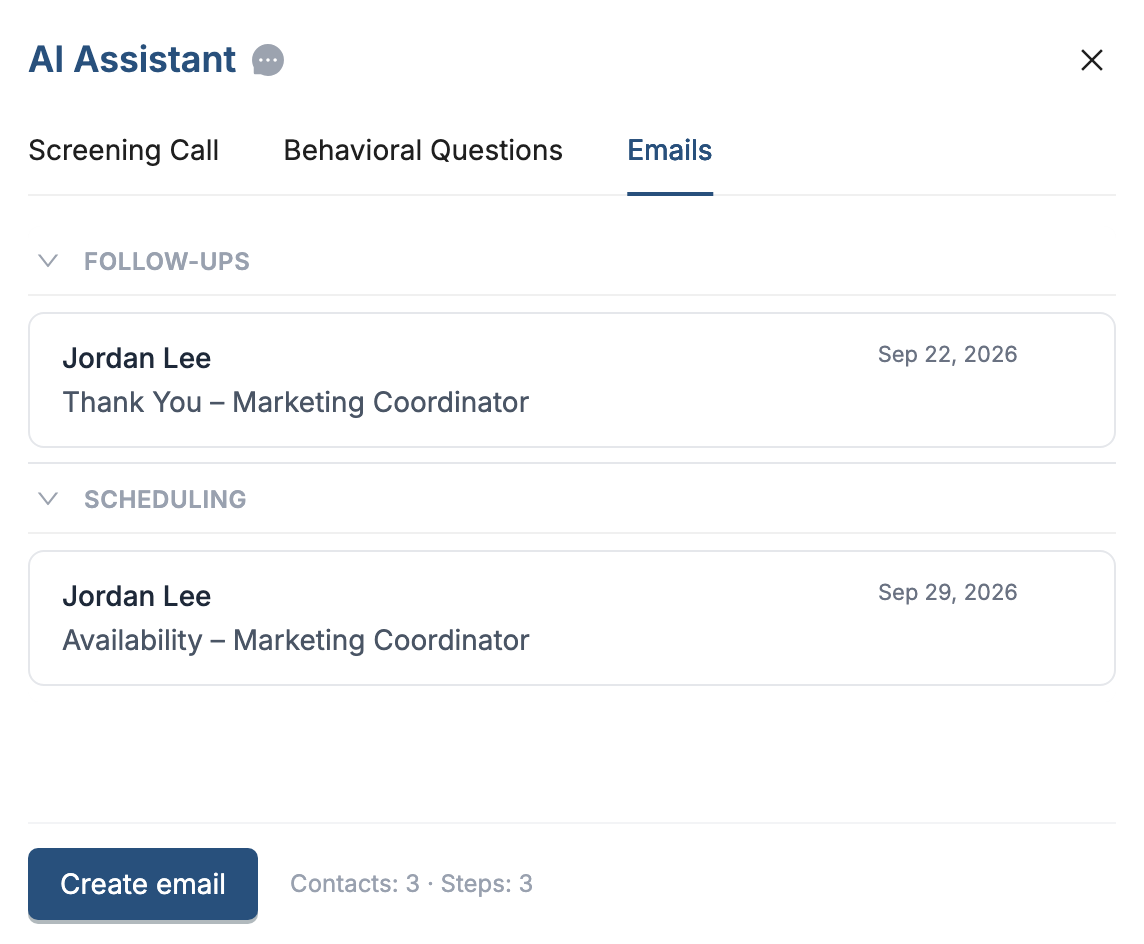
The AI Assistant on the same job drafts the emails (free to try, Premium for more AI usage). In the job's AI Assistant tab, open Emails and click Create email. Choose Follow-up under "What is this email about?" and pick a focus:
- Thank the interviewer(s) or Thank the recruiter/organizer for the thank-you email.
- Ask for a status update for the status check.
- Respond to rejection for a short reply to a no. It is the only Follow-up focus where picking a round is optional.
Choose the round under "What step do you want to follow up on?", add anything you want mentioned under Extra details for this email (for example, the project the interviewer described), and click Write with AI. Edit the draft so it sounds like you, then open it in your mail app or copy it. Save keeps it with the job.
Limits to know
- The tracker does not email you or send notifications. You see Follow up! only when you open it.
- Each email goes to one contact, so a panel means one email per interviewer. A follow-up email about a round needs at least one contact and one interview round on the job.
- Open in mail app appears only when the contact has an email address. HideJobs never sends the email for you.
When to stop following up after an interview
If a week passes after your first status check with no reply, send one more, shorter message in the same thread. In HideJobs, the AI Assistant's Reminder type with the Follow up on no response focus drafts this one:
After that, stop. Accountemps warns that persistence is fine but pestering can get you removed from the short list. Two unanswered checks tell you what you need to know, and the time is better spent on the next application. In the HideJobs tracker, change the job's status to No Response or Ghosted so it stops looking like a live lead.
If you get a rejection, a two-line reply thanking them and asking to be considered for future roles keeps the door open. Emails you sent before the interview, while waiting to hear back on the application, are covered in the follow-up email after a job application guide. And if the waiting is wearing you down, job search burnout has ways to keep going.

Anton writes about job search problems from firsthand experience. He builds tools to solve issues like repeated listings, irrelevant results, and inefficient filtering across job platforms.
Related Resources:
- Follow-Up Email After Job Application: When and What to Send - What to send when you have applied but have not heard back
- Job Application Tracker: What to Track and How to Set It Up - Keep every application, interview, and follow-up date in one list
- Job Search Burnout: How to Stay Organized and Keep Going - How to keep going when the replies stop coming