Quick Answer
Indeed and Glassdoor are now one company. Glassdoor LLC and Indeed, Inc. merged on July 1, 2026, and Indeed operates Glassdoor, but the two are still separate sites with separate terms. For a job seeker, three things changed:
- New Glassdoor accounts must sign in with Indeed. That links the two accounts, syncs your profile between them, and cannot be undone without deleting one of them.
- Applications on Glassdoor are processed by Indeed services, and Indeed job ads can appear on both sites, so you can see the same listing on both.
- Your reviews stay off your public profile, but Glassdoor says it cannot guarantee anonymity.
Use Glassdoor to research companies, do your daily searching on one site, and keep one record of where you applied. HideJobs, the browser extension I build, can hide the same companies on both sites with one list (Premium), and hide jobs you mark as applied on each site (Free).
What changed between Indeed and Glassdoor
If Glassdoor recently asked you to sign in with an Indeed account, you have seen the visible part of the Indeed and Glassdoor merger. Glassdoor's summary of its policy changes says: "Glassdoor services are now operated by Indeed following the merger of Glassdoor LLC and Indeed, Inc. on July 1, 2026." Its privacy policy now names Indeed, Inc. as the provider of Glassdoor.com and as the company responsible for your data.
Both already belonged to Recruit Holdings, according to its company history, but until July 1, 2026 they were separate companies. Now Glassdoor describes itself as "part of Indeed, a subsidiary of Recruit Holdings."
The websites themselves did not merge. Indeed's terms of service say the two "continue to be separate online platforms, subject to separate Terms of Use." Glassdoor still has its own site, reviews, and salary pages. Where you will notice the merger is the login and the job listings.
The dates that matter for job seekers:
- November 18, 2025: Glassdoor started offering sign-in with an Indeed account, and made it required for new users.
- April 20, 2026: the date Glassdoor's privacy policy gave for the end of its old login for existing users. After it, the policy says, "you may be required to log in with a connected account to get full access to Glassdoor."
- July 1, 2026: Glassdoor LLC and Indeed, Inc. merged.
- October 8, 2026: Glassdoor launched Glassdoor Recruiter in the U.S., a job matching tool built on listings from Indeed.
What you agree to when you sign in to Glassdoor with Indeed
Signing in to Glassdoor with your Indeed account links the two accounts. Indeed's terms call the result a "Connected Profile," where "certain profile information will be synced between your Indeed and Glassdoor profiles." Indeed's privacy policy gives examples of what syncs: "professional history, job preferences, and contact information."
Before you click, know what else the terms and Glassdoor's privacy policy say:
- The newest profile wins. When your two profiles disagree, Indeed's terms say "we will use the information from the most recently updated profile." An old job title or city on one site can replace the current one on the other, or the other way round.
- You cannot unlink. Once linked, you "may not unlink them or unsync your Connected Profile other than by deleting your Glassdoor or Indeed account."
- Deleting Indeed locks you out of Glassdoor: "If you delete your Indeed data or close your account, you will no longer be able to access Glassdoor services."
- Both sites keep a full copy. Glassdoor's privacy policy says Glassdoor and Indeed each "receive a complete copy of your Profile data" and keep it in sync until one of the accounts is deleted.
Before you link, open both profiles and fix the one you want to keep: current job title, location, contact details, and job preferences. Since the most recently updated profile is the one used when they conflict, update it last, right before you link.
If you are job hunting quietly, linking alone does not make you findable. Indeed tells employers that job seekers can be found with its sourcing tools only "if they choose to opt in," and that "Employers do not control this setting."
Are your Glassdoor reviews still anonymous?
Linking your Indeed account does not put your name on your reviews. Glassdoor's privacy policy, revised July 1, 2026, says your profile "will not publicly include or link to Your Content submitted semi-/anonymously to our services."
The same policy says Glassdoor "cannot guarantee your anonymity," because what you write and the identifiers shown with it "may allow someone to identify you or narrow down your identity to a small group of people (e.g., employees in a particular department at your company)." For reviews, it says you may be required to show personal data "such as your employer, job title, and location."
In practice, the risk depends on how many people share your job title and office. If you are one of three analysts in a small branch, a review with that title and city already narrows things down a lot. Leave out project names, dates, and incidents only your team would recognize, and wait to post until the details you describe are not traceable to a single recent event.
Indeed, Inc. is now the data controller for Glassdoor, so your reviews, salary reports, and interview reviews now sit with Indeed.
Why you see the same jobs on Indeed and Glassdoor
The same jobs appear because one Indeed ad can run on both sites. Indeed's help page for employers says: "Indeed job ads can appear on Indeed and Glassdoor when eligible. You still set up campaigns and pay through Indeed." Glassdoor's new Recruiter tool also pulls its openings "from Indeed's global hiring marketplace," according to Glassdoor's announcement.
Applying runs through Indeed too. The same help page says job seekers "can apply using Indeed Apply on Glassdoor jobs," and Glassdoor's privacy policy says that when you click apply, "your application is processed by our affiliates," a group that includes Indeed.
For you, that means:
- Searching both sites gives you fewer new jobs than it seems. Listings you scroll past on Glassdoor can be the same Indeed ads you already saw.
- It is easy to apply to the same opening twice. In HideJobs, save each job you mark as applied to the free job tracker and check it before you apply on the other site (how it works).
- Your Indeed activity can shape what Glassdoor shows you. Glassdoor's privacy policy says it may use your searches and activity on its affiliates' services "to personalize your experience and the jobs we show and recommend to you."
Glassdoor vs Indeed: do you still need both sites?
For finding openings, probably not. Since Indeed job ads can appear on both, running the same daily search on Indeed and Glassdoor can mean scrolling past the same listings twice.
For deciding where to apply, Glassdoor is still the reason to keep an account: its users post employer reviews, salary reports, benefit reviews, and interview reviews.
One way to split the two:
- Search on one site. Set your alerts and daily searches there, and stop repeating them on the other.
- Research on Glassdoor. Before you apply, read the company's reviews and salaries, and read its interview reviews before a first-round call.
- If you want employers to find you, try Glassdoor Recruiter (launched in the U.S.).
If you do not want the accounts linked at all, the only option the policy leaves is not signing in to Glassdoor with Indeed. That limits what you can do there: Glassdoor says you need an account "to access most of our services," and new accounts must use the Indeed login.
How to search both sites without doing everything twice
If you search both, a company you ruled out on Indeed can keep showing up on Glassdoor, and so can listings you already applied to. HideJobs filters job search results on both sites, and its company and keyword lists apply on both at once.
- Block a company once, hidden on both (Premium). Click the eye icon next to the company name on a job card, and that employer goes into one Hidden Companies list that applies on Indeed, Glassdoor, LinkedIn, and the other supported job boards. Matching is by exact company name (capitalization does not matter), so an employer that posts under two names needs both added.
- Hide jobs by keyword on both (Premium). One keyword list hides cards whose visible text contains words like "senior" or "commission." It reads the job card, not the full description.
- Hide jobs you applied to (Free). Every card gets a Mark as Applied button, and marked jobs disappear from your results. It is manual, it does not read Indeed's or Glassdoor's own applied status, and marks are kept per site: marking a job on Indeed does not hide its copy on Glassdoor. On Indeed it works without an account; on Glassdoor, HideJobs filters need a free HideJobs login.
- Keep one list of applications (Free, needs a login). When you are logged in and mark a job as applied, HideJobs asks "Add to Job Tracker?" Click Add to tracker and the job is saved to the HideJobs job tracker with the status Applied, whichever of the two sites it came from. That one list is where you check for the duplicate before applying again.
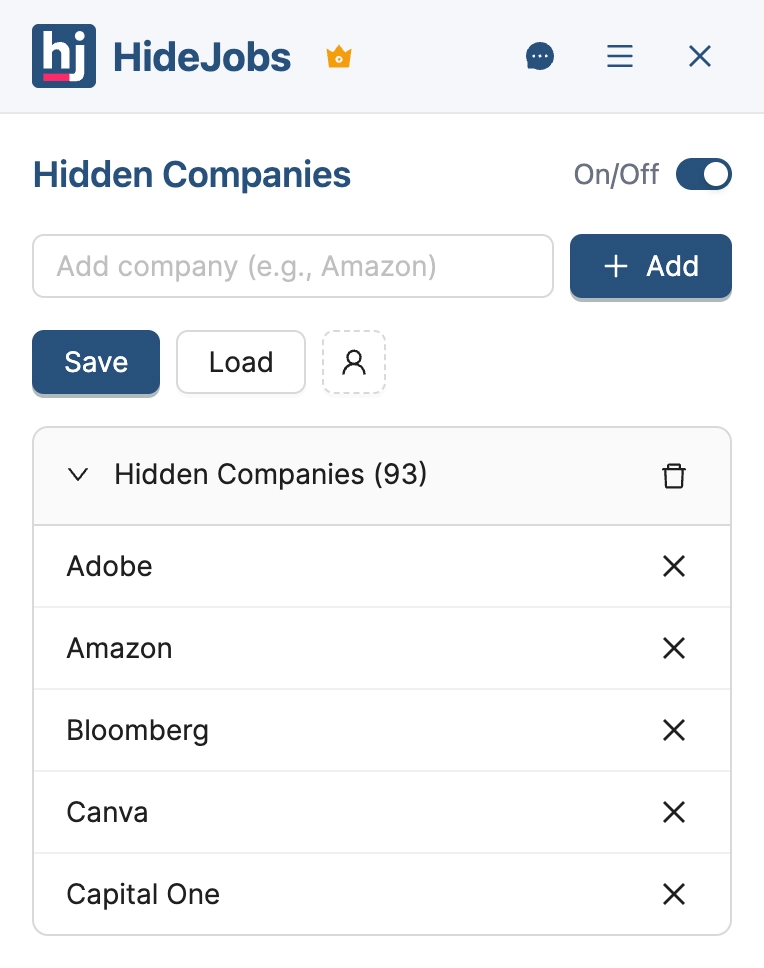
HideJobs works on search result pages only, not on a single job's page or in alert emails, and it cannot tell that a Glassdoor listing is the same job as one on Indeed. For the full company blocking setup, see how to exclude companies from your job search, and for what to record about each application, our guide to tracking job applications.

Anton writes about job search problems from firsthand experience. He builds tools to solve issues like repeated listings, irrelevant results, and inefficient filtering across job platforms.
Related Resources:
- How to Exclude a Company From LinkedIn Job Search - Block unwanted employers across LinkedIn, Indeed, and other job boards
- Job Application Tracker: What to Track and How to Set It Up - Keep one record of every application, whichever site it came from
- Indeed Advanced Search Is Gone. Here's What Still Works - Search operators and filters that still work on Indeed